 Soft
Soft
Business process automation made easy
AIBPA — AI business process automation. AIBPA2 goes one step further. Since SamurAI runs business workflows described in an XML file, why write that XML file yourself? With the AIBPA2 workflow you describe the process in words, an AI agent generates it, and SamurAI runs it — all without a single line of code written by you.
From a sentence to a running process
If a business process can be described in XML, it can be described in words — and AI can do the translation.
Describe the process
Write what should happen, in your own words: where the data comes from, what must be understood, where the result goes.
AI generates the application
A coding agent reads SamurAI's documentation and XSD schema and writes
samurai.xml, the prompts for the LLM steps and any small helper script.SamurAI validates and runs it
Validate, run from the command line, watch it live in the web panel, call it over REST or expose it as an MCP tool. Free LLM tiers first.
Readable result
The output is a short XML file you can read, review and version — not a black box.
Safe by design
Secrets stay in .env; commands are allow-listed; every run has a cost cap and an audit log.
Free to run
Free LLM tiers and local models first; deterministic “blind” steps cost nothing.
Importing recipes into Yummi
Yummi is a recipe web app built on FoxyUI. The goal: take a recipe from any web page or document and add it to Yummi with correct ingredients, quantities, units, category, steps and photos — automatically.
1The human request
This is the entire specification, sent once to an AI coding agent (Claude Code) inside the Yummi project — in Romanian, lightly edited for readability. The API key it contained has been removed here.
În subdirectorul „conector” vreau să generezi workflow-ul samurai care va injecta o rețetă în aplicația Yummi prin intermediul API-ului acesteia. Workflow-ul samurai va fi capabil să interpreteze conținutul unui link sau al unui document într-o rețetă culinară. Cheia API este ymk_••••••••. Samurai-ul va cere informațiile necesare din aplicație prin API, va identifica ingredientele, cantitățile, categoria rețetei, modul de preparare, cele mai relevante poze, dacă există, etc. și le va injecta în aplicație.
Translation: “In the “conector” subfolder I want you to generate the samurai workflow that injects a recipe into the Yummi app through its API. The samurai workflow will be able to interpret the content of a link or of a document into a cooking recipe. The API key is ••••. The samurai will request the necessary information from the app through the API, identify the ingredients, the quantities, the recipe category, the preparation method, the most relevant photos if any, etc. and inject them into the app.”
2What the AI generated
From that single request the agent produced a complete SamurAI workflow: samurai.xml (94 lines), the extraction prompt sarcini/extrage-reteta.md and a helper script scripts/yummi.py (Python standard library only) that reads web pages, .docx and .pdf files and talks to the Yummi API. The comments are in Romanian because the request was.
samurai.xml the generated application — open to read
<?xml version="1.0" encoding="UTF-8"?>
<!--
samurAI → Yummi: interpretează o rețetă dintr-un link, dintr-un document (.docx, .pdf, .txt, .md, .html, .doc, .rtf,
.odt) sau dintr-un text lipit și o trimite în aplicația Yummi prin API-ul ei (Yummi/docs/API-LLM.md).
pregateste BLIND citește sursa (pagina web: text + poze + date schema.org; documentul: text + poze încorporate)
și cere din Yummi categoriile, unitățile și lista de ingrediente (LOV) → contextul modelului
extrage LLM rețeta ca JSON: titlu, categorie, porții, timpi, ingrediente pe secțiuni cu cantități și
unități, pași pe etape, sfaturi, cele mai relevante poze (doar modele gratuite)
trimite BLIND atașează pozele alese, validează cu dryRun, corectează numele aproape identice cu LOV-ul,
verifică dublurile și salvează rețeta (privată) în contul cheii API
Cheile (furnizorii LLM, YUMMI_URL, YUMMI_API_KEY) stau în .env, lângă acest fișier. Comenzile: comands.txt.
-->
<class="t">samurai xmlns:xsi="http://www.w3.org/2001/XMLSchema-instance" xsi:noNamespaceSchemaLocation="samurai.xsd" version="1.0"
name="yummi-samurai">
<class="t">config>
<!-- doar furnizori gratuiți, cu cheile din .env; ultima rezervă: abonamentul Claude (CLI-ul claude) -->
<class="t">provider name="gemini" type="gemini" apiKey="${GEMINI_API_KEY}"/>
<class="t">provider name="mistral" type="mistral" apiKey="${MISTRAL_API_KEY}"/>
<class="t">provider name="groq" type="groq" apiKey="${GROQ_API_KEY}"/>
<class="t">provider name="openrouter" type="openrouter" apiKey="${OPENROUTER_API_KEY}"/>
<class="t">provider name="claude-sub" type="claude-code"/>
<class="t">model alias="gemini-flash-free" provider="gemini" model="gemini-flash-latest" freeTier="true" rpm="5" rpd="20"
quality="8" purposes="EXTRACTION"/>
<class="t">model alias="mistral-medium-free" provider="mistral" model="mistral-medium-latest" freeTier="true" rpm="60"
quality="8" purposes="EXTRACTION"/>
<class="t">model alias="gemini-flash-lite-free" provider="gemini" model="gemini-flash-lite-latest" freeTier="true" rpm="12" rpd="490"
quality="7" purposes="EXTRACTION"/>
<class="t">model alias="groq-gpt-oss-120b-free" provider="groq" model="openai/gpt-oss-120b" freeTier="true" rpm="20"
quality="7" purposes="EXTRACTION"/>
<class="t">model alias="openrouter-gemma-31b-free" provider="openrouter" model="google/gemma-4-31b-it:free" freeTier="true" rpm="8" rpd="45"
quality="6" purposes="EXTRACTION"/>
<class="t">model alias="claude-sub-haiku" provider="claude-sub" model="haiku" subscription="true"
quality="5" purposes="EXTRACTION"/>
<class="t">llm><class="t">freeTier enabled="true" cooldown="65s"/></class="t">llm>
<!-- nimic plătit: plafon de siguranță pe rulare -->
<class="t">orchestrator defaultTimeout="15m" maxRunCost="0.01" historySize="20"/>
<class="t">cost factor="1" currency="USD"><class="t">ledger file="./data/costs.jsonl"/></class="t">cost>
<class="t">security>
<class="t">commands allow="python3" maxTimeout="5m"/>
<class="t">audit file="./data/audit.jsonl"/>
</class="t">security>
</class="t">config>
<class="t">agents>
<class="t">command name="verifica" workDir="." description="Legătura cu Yummi: contul cheii API, drepturile, categoriile și LOV-ul (cost 0)">
<class="t">arg>python3</class="t">arg><class="t">arg>scripts/yummi.py</class="t">arg><class="t">arg>verifica</class="t">arg>
</class="t">command>
<class="t">command name="pregateste" workDir="." outputVar="context" processTimeout="3m"
description="Citește sursa (link, document sau text) și contextul din Yummi: categorii, unități, ingrediente (LOV), poze candidate">
<class="t">arg>python3</class="t">arg><class="t">arg>scripts/yummi.py</class="t">arg><class="t">arg>pregateste</class="t">arg><class="t">arg>{{runInput}}</class="t">arg>
</class="t">command>
<class="t">llm name="extrage" purpose="EXTRACTION" jsonMode="true" temperature="0" maxTokens="6000"
acceptRegex=""title"\s*:" maxEscalations="2" retries="1" retryBackoff="20s"
promptFile="sarcini/extrage-reteta.md" outputVar="reteta"
description="Interpretează rețeta: titlu, categorie, porții, timpi, ingrediente cu cantități și unități (din LOV), pași, sfaturi, poze (JSON)">
<class="t">system>Ești un bucătar-redactor care transcrie rețete pentru aplicația Yummi. Extragi exact ce scrie în sursă, fără să inventezi, folosești numele de ingrediente, unitățile și categoriile date. Răspunzi doar cu JSON valid.</class="t">system>
</class="t">llm>
<class="t">command name="trimite" workDir="." pipeInput="true" processTimeout="3m"
description="Atașează pozele alese, validează (dryRun), corectează numele de ingrediente, verifică dublurile și salvează rețeta în Yummi">
<class="t">arg>python3</class="t">arg><class="t">arg>scripts/yummi.py</class="t">arg><class="t">arg>trimite</class="t">arg>
</class="t">command>
<class="t">command name="valideaza" workDir="." pipeInput="true" processTimeout="3m"
description="Ca trimite, dar doar validează în Yummi (dryRun) și arată rețeta interpretată, fără să o salveze">
<class="t">arg>python3</class="t">arg><class="t">arg>scripts/yummi.py</class="t">arg><class="t">arg>trimite</class="t">arg><class="t">arg>--dry</class="t">arg>
</class="t">command>
</class="t">agents>
<class="t">workflows>
<class="t">workflow name="importa"
description="Importă în Yummi rețeta dintr-un link, dintr-un document (.docx, .pdf, .txt, .md, .html, .doc, .rtf, .odt; un .txt poate conține doar linkul) sau dintr-un text lipit: citește sursa și contextul aplicației, interpretează cu un model gratuit ingredientele, cantitățile, categoria, pașii și pozele relevante, apoi salvează rețeta (privată) și întoarce linkul ei">
<class="t">ref agent="pregateste"/>
<class="t">ref agent="extrage"/>
<class="t">ref agent="trimite"/>
</class="t">workflow>
<class="t">workflow name="previzualizare"
description="La fel ca importa, dar nu salvează: arată rețeta interpretată și rezultatul validării din Yummi (ingrediente noi în LOV, avertismente)">
<class="t">ref agent="pregateste"/>
<class="t">ref agent="extrage"/>
<class="t">ref agent="valideaza"/>
</class="t">workflow>
<class="t">workflow name="context" description="Doar contextul trimis modelului: sursa citită, pozele candidate, categoriile și LOV-ul din Yummi (cost 0)" agent="pregateste"/>
<class="t">workflow name="verifica" description="Verifică legătura cu Yummi și dreptul de injecție prin API (cost 0)" agent="verifica"/>
</class="t">workflows>
</class="t">samurai>
sarcini/extrage-reteta.md prompt of the LLM agent “extrage”
Extrage UNA singură rețetă din sursa de mai jos și răspunde DOAR cu un obiect JSON pentru API-ul Yummi
(`POST /api/v1/recipes`, schema din Yummi/docs/API-LLM.md §8), cu un singur câmp în plus: `photos` = indicii pozelor
alese din lista „POZE CANDIDATE”.

Reguli:

1. **Nu inventa.** Folosește doar ce scrie în sursă. Ce lipsește rămâne nefolosit (nu pune câmpul). Excepție:
   `difficulty` (1 = puțini pași, tehnici simple; 2 = mai multe etape; 3 = tehnici delicate sau timp lung).
2. **Ignoră zgomotul**: povești personale, biografia autorului, reclame și titluri de reclame (ex. „Gustă Sarmale”,
   „Utile pescuit”), linkuri spre alte rețete, recenzii, comentarii, butoane, cuprinsuri. Dacă rețeta apare de mai multe
   ori (articol + fișă de rețetă), combină-le o singură dată, fără dubluri.
3. **Limba**: română, cu diacritice (ș, ț). Traduce dacă sursa e în altă limbă.
4. **title**: numele scurt al rețetei (fără „Rețetă de”, fără „rețetă originală”), max. 160 de caractere.
5. **category**: exact unul dintre numele din „CATEGORII YUMMI”.
6. **summary**: 1–2 propoziții scrise de tine, despre ce este preparatul (nu copia introducerea).
7. **servings**: numărul de porții din sursă (ex. „pentru 25 de porții” → 25); la cocktailuri = pahare.
   **prepMinutes** / **cookMinutes**: DOAR dacă sursa scrie explicit „timp de pregătire / gătire / total” (ore →
   minute). Nu le calcula din pași („fierbe 10 minute”) — fără timp explicit, lipsesc.
8. **Ingrediente** — în `ingredientSections` dacă sursa le grupează („Pentru aluat”, „Pentru sos”), altfel în
   `ingredients`. **Fiecare rând din lista de ingrediente a sursei apare o dată** (verifică la final că n-ai sărit
   niciunul, inclusiv verdețurile și condimentele de la sfârșitul listei). Ingredientele pomenite doar în pași
   (ex. „sare și mălai pentru frecat peștele”) se adaugă și ele, fără cantitate.
   Fiecare ingredient e un obiect `{"name", "quantity", "unit", "note", "optional"}`:
   - `name`: produsul, cu litere mici, **exact un nume din „INGREDIENTE DIN LOV”** când există unul potrivit
     (ex. „morcovi”, „ardei gras”, „smântână”); detaliile merg în `note` („tăiat cubulețe”, „galben și roșu”).
     Fără virgule în nume. Un nume nou doar când chiar nu există echivalent în listă.
   - `quantity`: număr cu punct zecimal (2,5 kg → 2.5); `unit`: una din „UNITĂȚI ACCEPTATE” (forma de singular:
     „legătură”, „lingură”); fără unitate la bucăți („5 gălbenușuri” → quantity 5, name „gălbenușuri”).
   - interval de cantitate („1-2 legături de mărar”) → `quantity` ca șir: `{"name": "mărar", "quantity": "1-2",
     "unit": "legătură", "note": "verde, tocat"}`.
   - fără cantitate („supă de pește sau apă”, „sare după gust”) → doar `name` (+ `note`: „sau apă”, „după gust”).
   - `optional: true` pentru decor, variante, „opțional”, „după preferință”.
9. **Pași** — în `stepSections` dacă sursa are etape cu titlu („Pregătim peștele”, „Liezonul”), altfel în `steps`.
   O acțiune principală pe pas, fără numerotare, fără să repeți lista de ingrediente, fără sfaturi lungi.
10. **notes**: UN SINGUR șir de text cu sfaturile utile ale sursei (secrete, variante, înlocuitori, păstrare,
    servire), pe scurt, câte unul pe rând (separate prin \n).
11. **photos**: cel mult 3 indici din „POZE CANDIDATE”, cei mai relevanți întâi — primul = preparatul terminat
    (va fi coperta), apoi etape importante. Doar poze ale ACESTEI rețete: nu alege pozele altor rețete recomandate
    (alt nume în textul alternativ / alături), logo-uri sau autorul. Dacă nu e niciuna potrivită: `[]`.
12. **public**: `false`.

Format (exemplu de structură, nu de conținut):

{"title": "...", "category": "...", "summary": "...", "servings": 4, "difficulty": 2, "public": false,
 "ingredientSections": [{"title": "Pentru ciorbă", "ingredients": [
   {"name": "ulei", "quantity": 50, "unit": "ml"},
   {"name": "morcovi", "quantity": 400, "unit": "g", "note": "tăiați cubulețe"},
   {"name": "mărar", "quantity": "1-2", "unit": "legătură", "note": "tocat"}]}],
 "stepSections": [{"title": "Zarzavatul", "steps": ["Încinge uleiul în ceaun.", "..."]}],
 "notes": "Primul sfat.\nAl doilea sfat.",
 "photos": [1, 6]}

{{input}}
${GEMINI_API_KEY}, ${YUMMI_API_KEY} … and read from .env at run time.3Commands
Everything runs with the SamurAI jars and Java — nothing to compile.
# 1. check the application (cost 0) · verifică aplicația (cost 0)
java -jar bin/samurai-studio-1.0-all.jar validate samurai.xml
java -jar bin/samurai-studio-1.0-all.jar list samurai.xml
java -jar bin/samurai-studio-1.0-all.jar run samurai.xml verifica

# 2. import a recipe · importă o rețetă — link, document or text
java -jar bin/samurai-studio-1.0-all.jar run samurai.xml importa "https://pofta-buna.com/storceag-ciorba-pescareasca/"
java -jar bin/samurai-studio-1.0-all.jar run samurai.xml importa Storceag.docx

# 3. preview without saving · previzualizare fără salvare
java -jar bin/samurai-studio-1.0-all.jar run samurai.xml previzualizare Storceag.docx

# 4. REST API + live web panel on one port · API REST + panoul web pe un port
java -jar bin/samurai-studio-web-1.0.jar serve samurai.xml --port 9010

# 5. every workflow as an MCP tool · fiecare flux ca unealtă MCP
java -jar bin/samurai-studio-1.0-all.jar mcp samurai.xml
One orchestrator, five agents, six models
What the AI designed, as SamurAI runs it. Only one step needs an LLM; the rest are deterministic and free.
Reads the source — web page (text, photos, schema.org recipe data), document (text + embedded photos) or pasted text — and asks Yummi for categories, units and ingredient list (LOV).
Turns the source into Yummi's recipe JSON: title, category, servings, ingredients by section with quantities and units from the LOV, steps, tips, best photos. JSON mode, temperature 0.
Attaches the chosen photos, validates with a dry run, fixes near-identical ingredient names, refuses duplicates and saves the recipe (private) to the API key's account.
Models available to “extrage” (from samurai.xml) — free tiers chosen by quality and quota, escalation on failure (max. 2):
- gemini-flash-free
- mistral-medium-free
- gemini-flash-lite-free
- groq-gpt-oss-120b-free
- openrouter-gemma-31b-free
- claude-sub-haiku
Two more agents: verifica (checks the Yummi connection and API rights) and valideaza (like trimite, but dry run only).
importa — pregateste → extrage → trimite: import and saveprevizualizare — pregateste → extrage → valideaza: preview, nothing savedcontext — only pregateste: what the model would see (cost 0)verifica — connection and rights check (cost 0)No sub-orchestrators are needed here: one orchestrator runs the four workflows.
Running it — screenshots from samurai-web
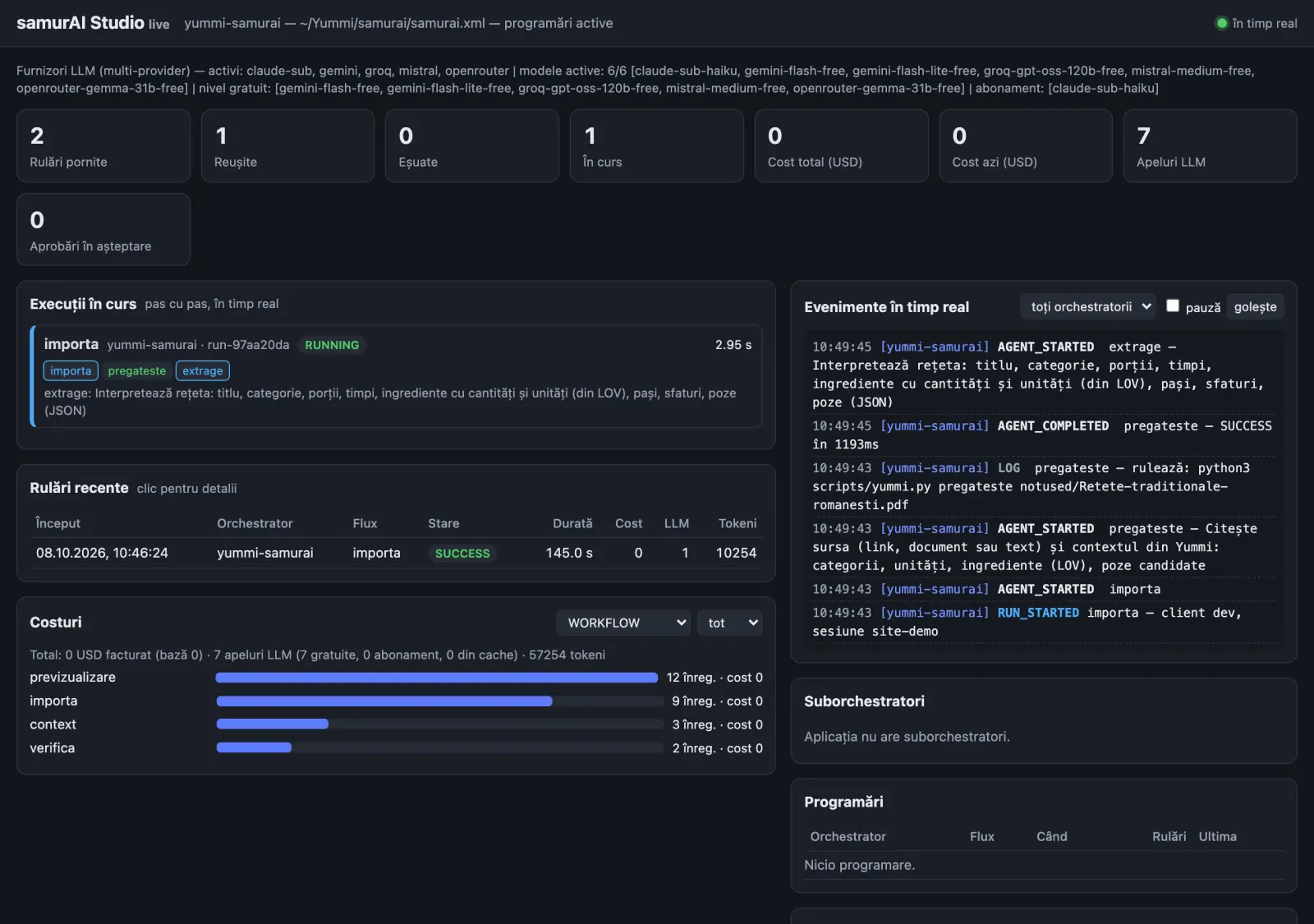
Two real imports, run on October 8, 2026 through the REST API and watched in SamurAI's live web panel. Local paths are masked.
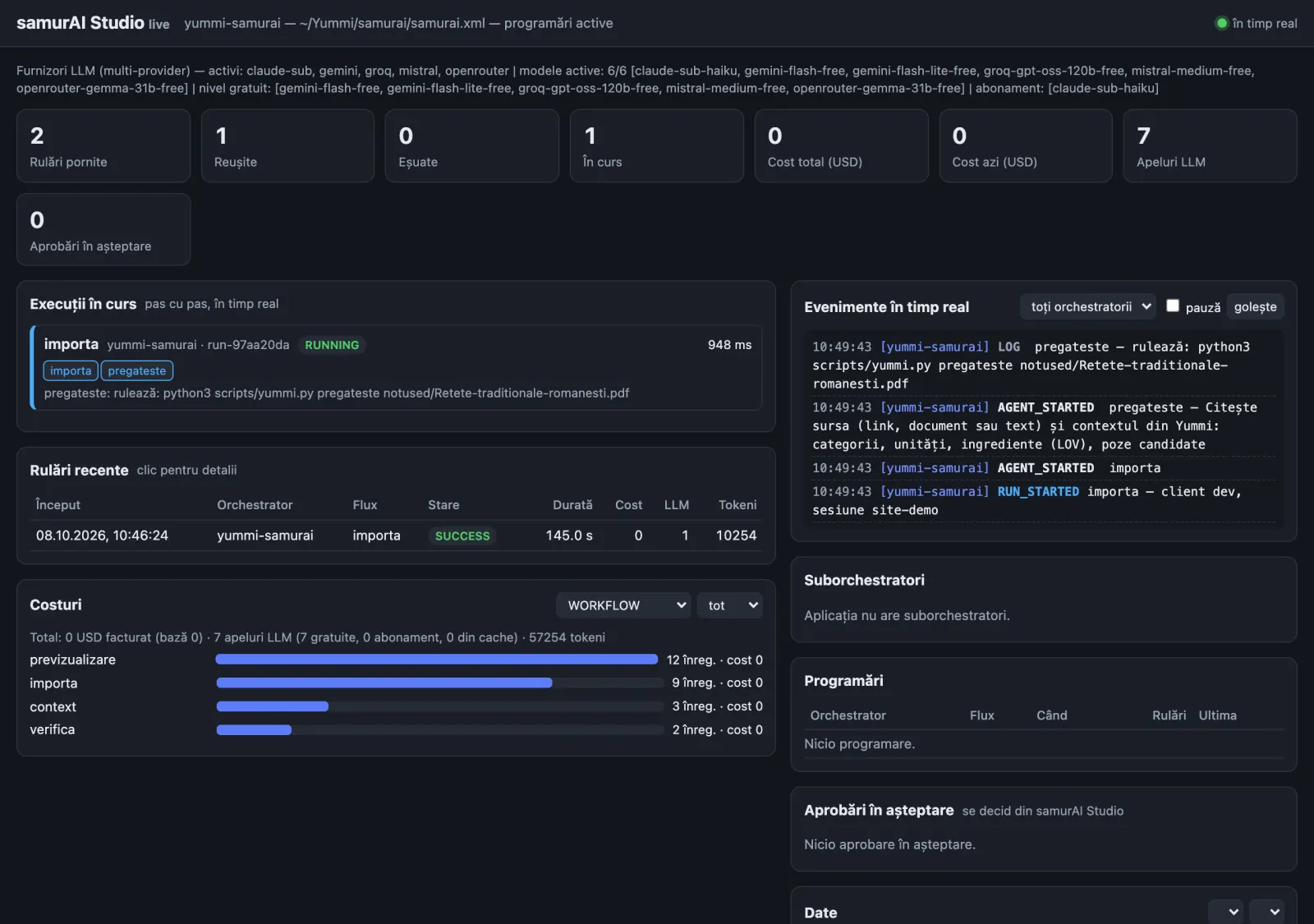
pregateste is done in 1.2 s, the LLM agent extrage is working. Live events on the right.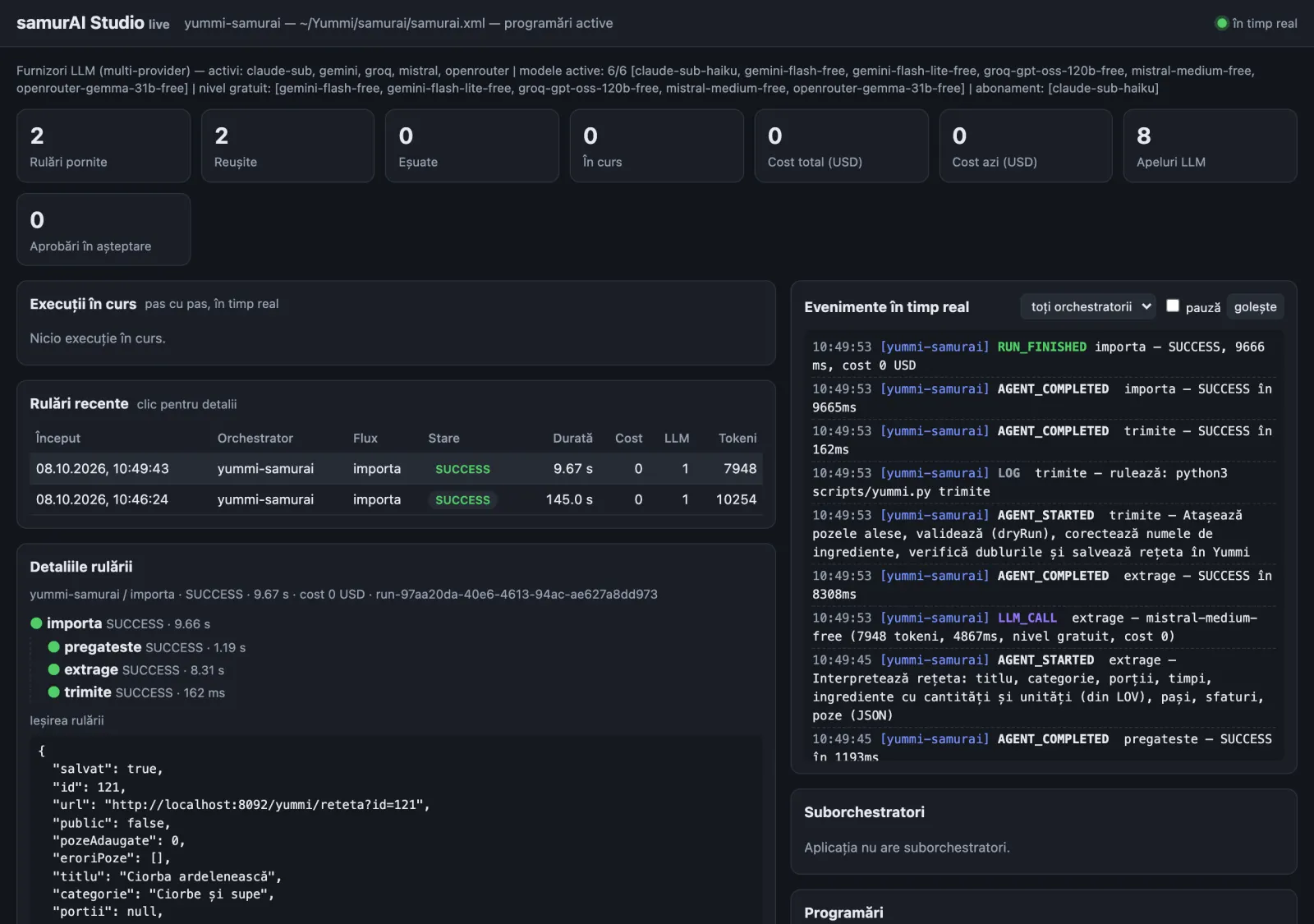
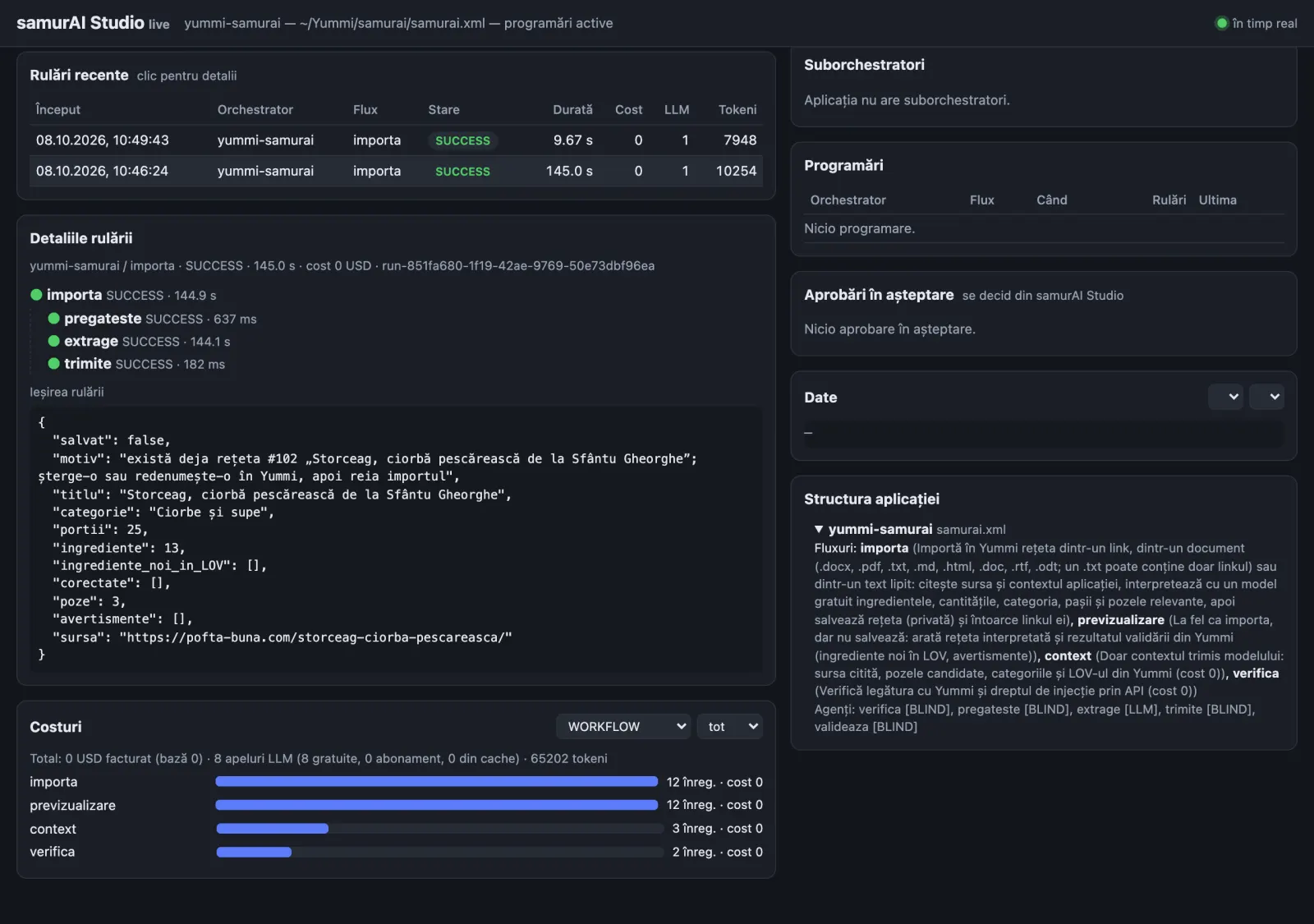
The result in Yummi
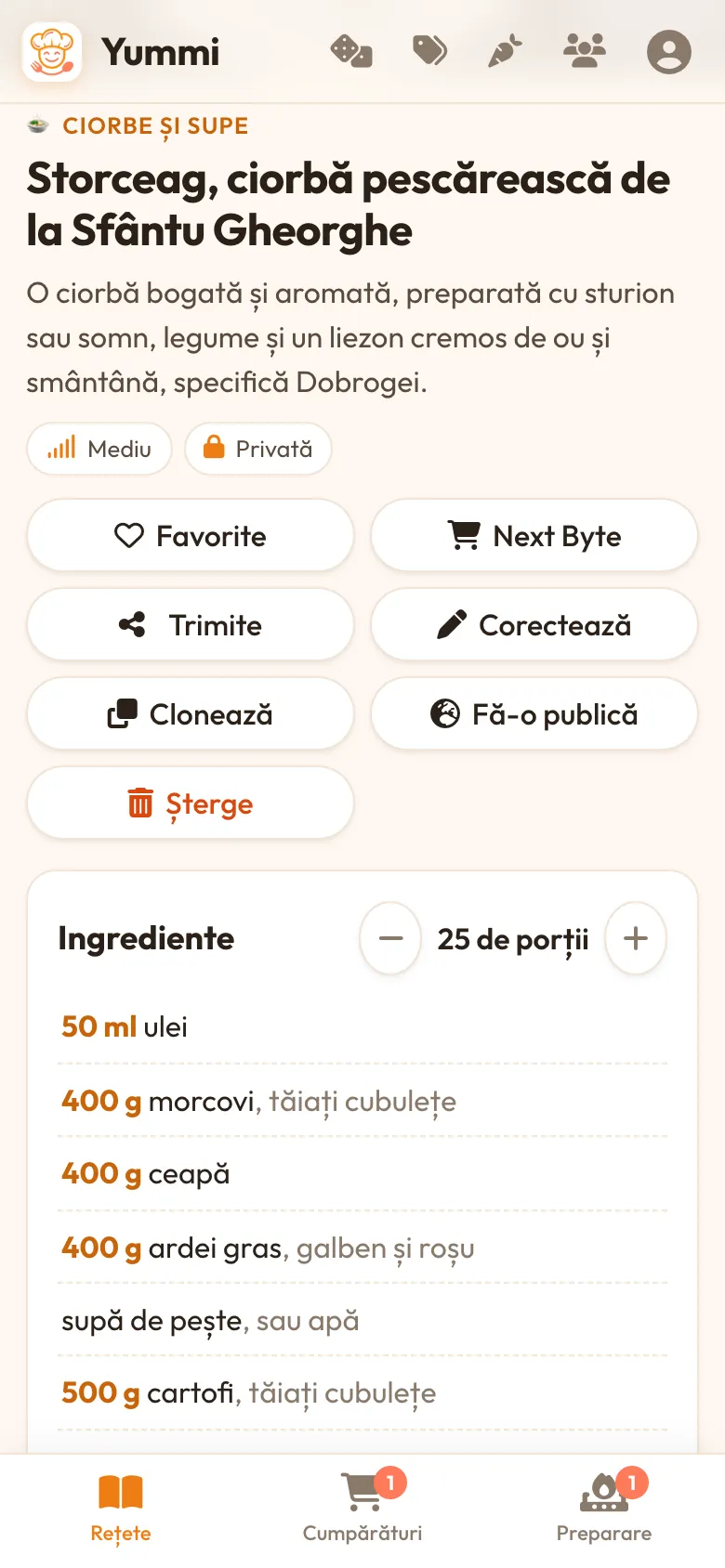
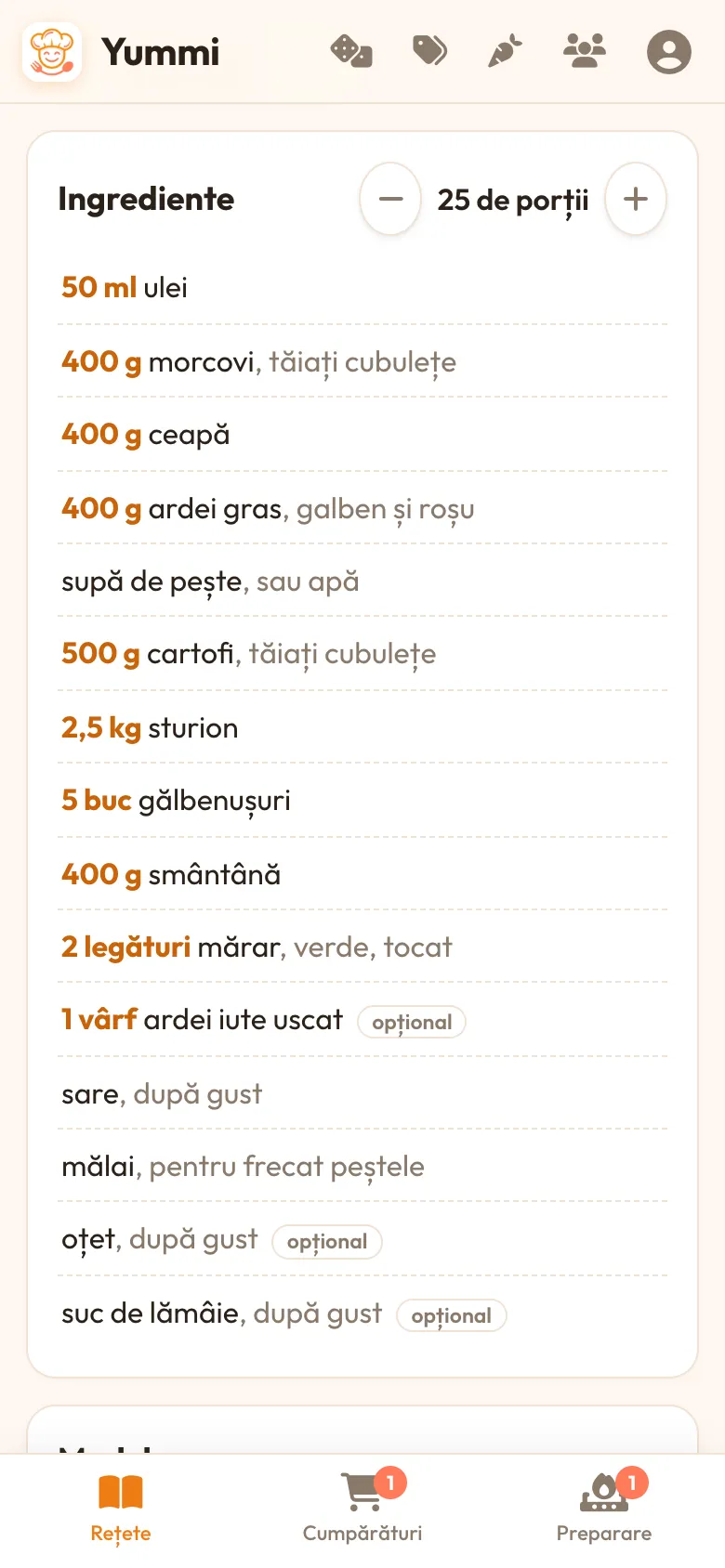
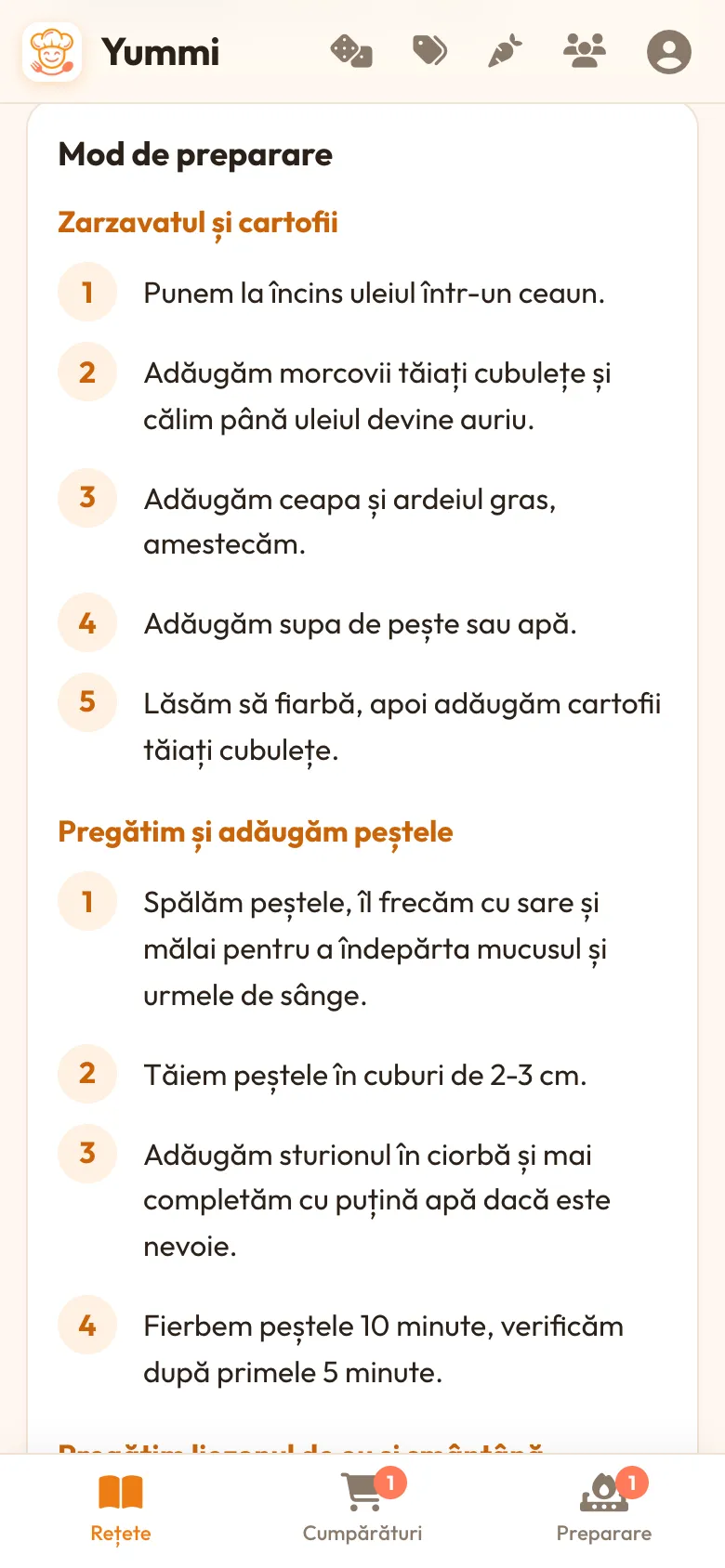
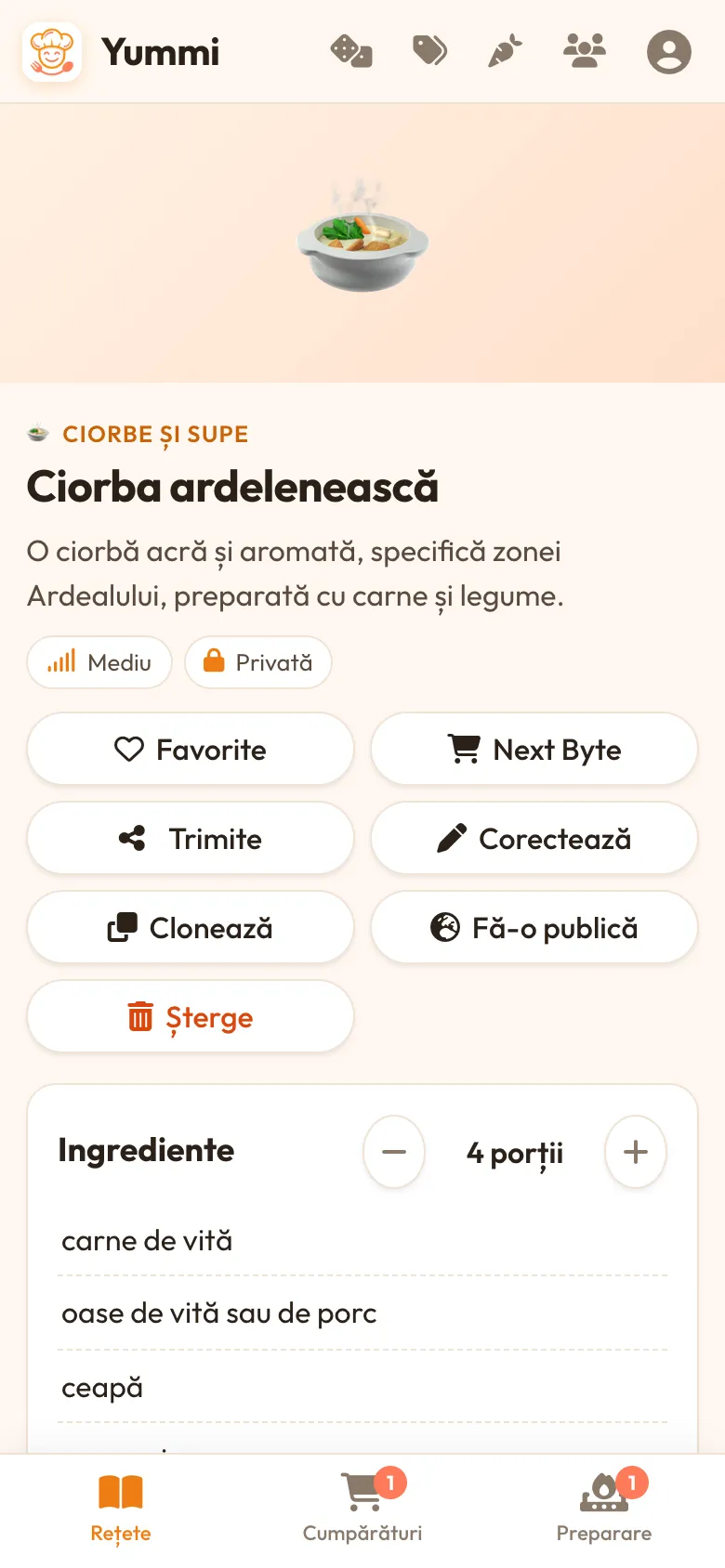
The dish photo imported with the Storceag recipe belongs to the original site and is left out of these screenshots.
 SamurAI — the framework behind it31 LLM provider types, XML workflows, Studio, REST, MCP. Source and documentation on GitHub.
Frequently asked questions
What is the difference between AIBPA and AIBPA2?
AIBPA (AI Business Process Automation) means running business processes with AI agents — at SoftWay, with the SamurAI framework. AIBPA2 adds a second layer of AI: the automation itself is written by AI from a plain-language description, so nobody writes code.
What is AIBPA2?
AIBPA2 is a SoftWay workflow: you describe a business process in plain language, an AI coding agent generates a SamurAI application (an XML file plus prompts and small helpers), and SamurAI runs it. No code is written by a person.
Which AI generates the XML?
Any capable AI coding agent that can read SamurAI's documentation and XSD schema. The Yummi example was generated by Claude Code from a single request.
Is it safe to let AI write the automation?
The result is a short, readable XML file validated against an XSD. Secrets stay in .env and are referenced as variables, shell commands are restricted to an allow-list, every run has a cost cap and is written to an audit log, and approval gates can require a human decision before sensitive steps.
How much does it cost to run?
In the Yummi example, nothing: only free LLM tiers are configured, with a $0.01 safety cap per run. Deterministic steps (reading sources, calling APIs, saving) use no LLM at all.
Can it automate other processes?
Yes. The same approach works for ticket triage, document and invoice processing, approvals, reports and data synchronization between systems — anything SamurAI can describe in XML.